
AI was supposed to give us our time back. For many teams, it’s quietly doing the opposite, and AI burnout is becoming a real risk.
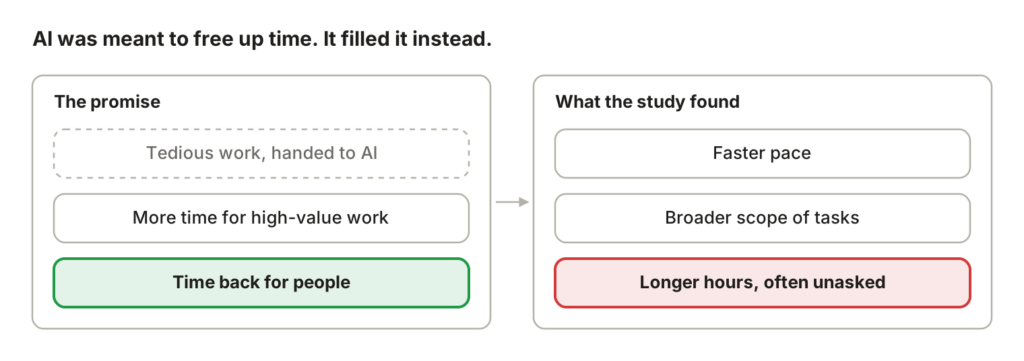
The pitch is familiar. Hand the tedious work to AI, and people get more time for high-value thinking. But new research published in Harvard Business Review, “AI Doesn’t Reduce Work – It Intensifies It,” found something different. AI tools didn’t consistently reduce work. They intensified it.
The study was led by Aruna Ranganathan, an associate professor at UC Berkeley’s Haas School of Business who studies the future of work, and Xingqi Maggie Ye, a Ph.D. student at Berkeley Haas researching how generative AI reshapes work practices and professional identity. Over eight months, they followed about 200 workers at a company that gave staff access to enterprise AI subscriptions. Using AI was voluntary, not mandated.
Even so, employees:
- Worked at a faster pace
- Took on a broader scope of tasks
- Stretched work into more hours of the day, often without anyone asking them to
Nobody was forced to do more. People did more because AI made doing more feel possible, accessible and rewarding. That’s exactly what makes it hard to spot, and why it needs to be designed for.
Three ways AI intensifies work
1. Task expansion: everyone becomes a bit of everything
AI lets people step into work that used to belong to someone else. Things they would once have outsourced, deferred or avoided suddenly feel within reach.
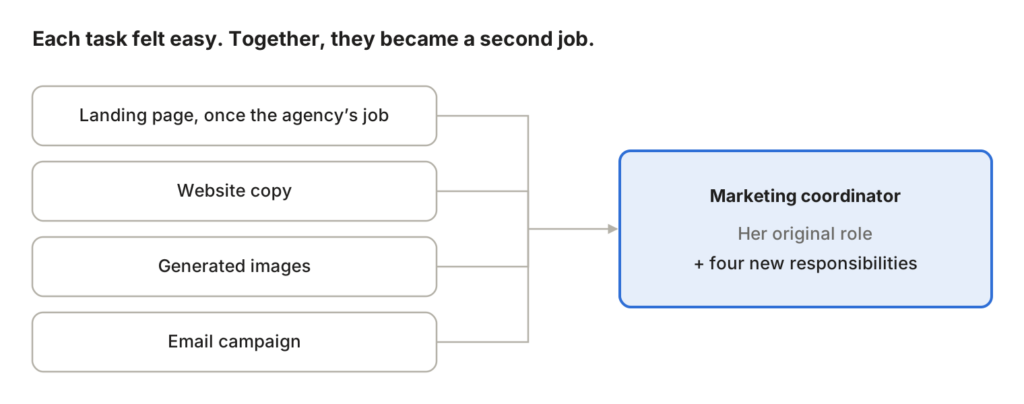
Picture a marketing coordinator at a mid-sized accounting firm. Last year, a new landing page meant briefing the web agency and waiting two weeks. This year, she builds it herself with an AI website builder over a few afternoons. Then she writes the copy, generates the images and drafts the email campaign to promote it. Each step felt easy. Together, they quietly added a second job to her first.
2. Blurred boundaries: work becomes ambient
Because starting a task with AI takes seconds, work slips into the gaps of the day. A prompt during lunch. A draft generated in the middle of a meeting. A quick request while a file loads.
A common example is the “one last prompt” before leaving the office. A project manager asks AI to summarize the week’s client emails into a status report, then heads home. On the train, she checks the output on her phone and tweaks it. After dinner, she sends a follow-up prompt. She never decided to work that evening. It just happened.
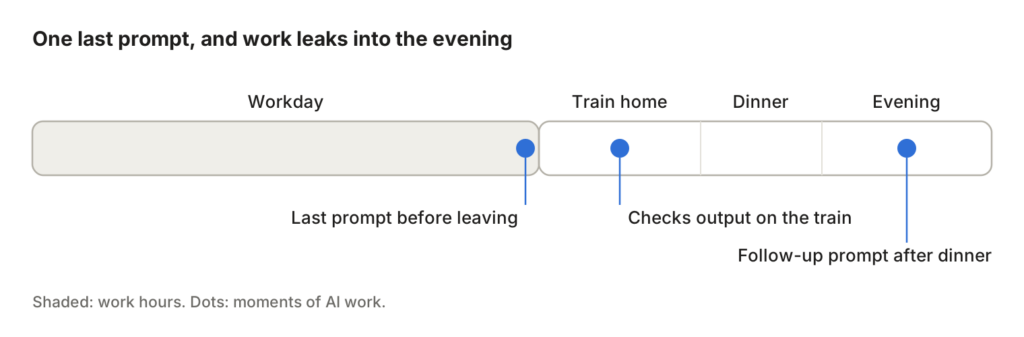
The researchers found that when prompting during breaks became a habit, people lost their sense of recovery. Breaks stopped feeling like breaks. Work felt less bounded and more ambient, and the line between work and non-work became easy to cross.
3. More multitasking: always juggling
AI turned many workers into managers of several active threads at once. It felt like having a partner. But the reality was constant switching, frequent checking of AI outputs and a growing pile of open tasks.
Think of a consultant with three AI chats open. One is drafting a client proposal. Another is analyzing a spreadsheet. A third is rewriting a process document. Every few minutes she flips between them to check, correct and re-prompt. By 3pm, she has made progress on everything and finished nothing. She feels productive and exhausted at the same time.
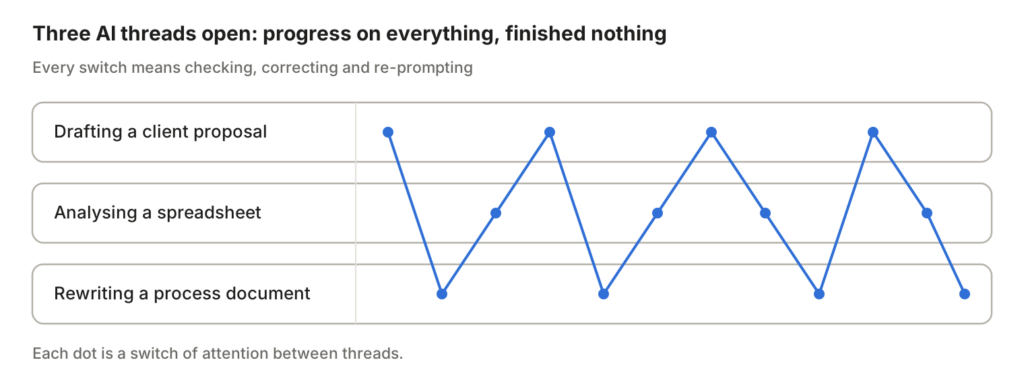
Many workers in the study said they were doing more at once, and felt more pressure, than before AI. Several said that even though they felt more productive, they didn’t feel less busy. Some felt busier.
Why AI workload creep leads to burnout
In the early days, AI feels like a superpower. People experiment, ship more and get noticed for it. But once the novelty wears off, many find their workload has grown, and they’re stretched across everything that has landed on their plate.
That workload creep has realThe researchers found that when prompting during breaks became a habit, people lost their sense of recovery. Breaks stopped feeling like breaks. Work felt less bounded and more ambient, and the line between work and non-work became easy to cross. costs:
- Cognitive fatigue and burnout. Constant switching and no true breaks wear people down.
- Weaker decisions and more errors. A tired reviewer is more likely to approve an AI-drafted contract clause or financial summary without catching the mistake in it.
- Lower quality and higher turnover. Over time, stretched people produce weaker work, and some of them leave.
There’s a leadership problem too. When everyone looks busier and more productive, it becomes hard to tell genuine productivity gains from unsustainable intensity. A dashboard full of completed tasks can hide a team running on empty.
The researchers’ answer is not to restrict AI. It’s for leaders to build what the researchers call an “AI practice”: a deliberate set of norms that shapes how and when the team uses AI, so the gains last. In this article, we call these AI Work Norms.
What are AI Work Norms?
AI Work Norms are a deliberate set of team agreements that shape how and when people use AI at work. They build intentional pauses, sequencing and human connection into everyday workflows, so the productivity gains from AI don’t come at the cost of burnout, errors or poor decisions.
How to build AI Work Norms that prevent burnout
AI Work Norms only work if they show up in how work actually gets done. Good intentions in a policy document fade fast. Norms built into everyday workflows stick. That’s where Way We Do comes in: you can design these habits directly into your procedures, Activated Checklists and workflows, so the healthy way of working becomes the default way.
Here’s how the three practices from the research translate into real workflows.
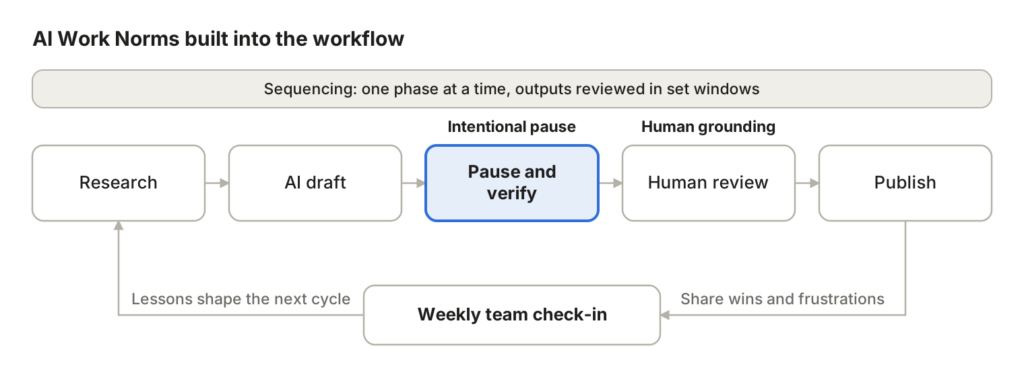
1. Intentional pauses
The idea is simple: build moments into the workflow where people stop, step back and check before moving on. Pauses support better decisions and healthier boundaries, especially when AI makes it tempting to keep going.
What it looks like in Way We Do:
- A “pause and verify” step in AI-assisted procedures. In a client proposal workflow, add a step after the AI draft: “Step away for at least 15 minutes, then reread against the client brief.” Include checklist items such as “Have I checked every figure against the source?” and “Would I sign my name to this as-is?”
- Decision checkpoints before high-stakes actions. Before an AI-drafted policy, contract or customer communication is published, a Supervisor Sign-off step routes it to a second person for approval. The pause is built in, not left to willpower.
- An end-of-day shutdown checklist. A short recurring checklist: note open AI threads, write the next step for each, and close them. Nothing is left “running” overnight, so there’s no pull to check in from the couch.
Example: A bookkeeping team uses AI to draft monthly client reports. Their Way We Do procedure now includes a mandatory review step the next morning, not the same afternoon. Errors caught at review dropped, and nobody feels the need to finish reports at 7pm.
2. Sequencing
Sequencing means controlling the order and timing of work rather than reacting to every AI output as it appears. It includes batching non-urgent notifications, holding updates until natural breakpoints and protecting focus time. Work moves forward in clear phases, with fewer costly context switches.
What it looks like in Way We Do:
- Phase your workflows. Break AI-assisted work into distinct stages, such as research, draft, review and publish. Each stage is assigned and completed before the next begins, so people aren’t juggling five half-finished drafts.
- Scheduled review windows. Instead of reviewing AI outputs the moment they arrive, set up a recurring task, for example 10am and 3pm daily, to batch-review everything generated since the last window.
- Protected focus blocks as part of the role. Document team norms in a procedure: focus blocks are shielded from non-urgent requests, and updates are held until the next breakpoint.
- Limit work in progress. Set a team norm, captured in your operating procedures, that each person has no more than a set number of active AI threads or open tasks at once.
Example: A marketing team was generating social posts, blog drafts and ad copy in parallel all day. They rebuilt their content process in Way We Do as a weekly sequence: Monday for briefs, Tuesday and Wednesday for AI-assisted drafting, Thursday for review and approval, Friday for scheduling. Output stayed the same. The constant context-switching disappeared.
3. Human grounding
AI work is often solo work. Hours of prompting and reviewing can leave people isolated and narrow their thinking. Creative insight depends on hearing multiple human viewpoints, so protecting time for listening and connection matters.
Short check-ins, shared reflection moments and structured dialogue interrupt continuous solo work with AI and restore perspective. These are exactly the kinds of rhythms you can set up in Way We Do.
What it looks like in Way We Do:
- Recurring team check-ins. Schedule a weekly 15-minute check-in checklist: What did AI help with this week? Where did it create extra work? Is anyone carrying too much?
- Shared reflection after major AI-assisted projects. Add a retrospective step at the end of a project workflow: what worked, what didn’t, and what should change in the process next time.
- Structured peer review. Route AI-generated work to a colleague, not just back to its author. A second human perspective catches errors and sparks better ideas.
- Workload check-ins for managers. A monthly one-on-one checklist that asks directly about scope creep and after-hours work, so leaders can tell real productivity gains from unsustainable intensity.
Example: A consulting firm noticed its consultants were spending most of the day alone with AI tools. They added a Friday “show and tell” checklist in Way We Do, where each consultant shares one AI win and one AI frustration. It became the place where good prompts got shared, duplicate work got spotted, and overloaded team members got help.
A bonus practice: clarify who owns what
Task expansion happens when it’s unclear whose job something is. Way We Do lets you assign procedures and tasks to roles, so it’s clear who owns the website, the policy library or the customer FAQ. When someone uses AI to step into new territory, there’s a simple question to ask first: is this mine, or should it go to the person who owns it?
Easier to start, harder to stop
AI makes it easier to do work, but harder to stop. Left alone, that combination leads to faster pace, wider scope and longer days, until AI burnout sets in or quality slips.
AI Work Norms are the counterbalance. They protect moments for recovery and reflection even as work speeds up. And they work best when they aren’t a memo people forget, but a set of habits built into the way your team actually works.
A good place to start:
- Pick one AI-assisted process your team runs often, such as proposals, reports or content.
- Map it in Way We Do with clear phases, a pause-and-verify step and a human review.
- Add a short weekly check-in so the team can talk about what AI is adding, and what it’s taking.
AI can absolutely make your organization more productive. The goal is to make sure that productivity is sustainable, and that your people are still thriving when the novelty wears off.
Frequently asked questions
Does AI cause burnout?
AI doesn’t cause burnout on its own, but it can contribute to it. Research from UC Berkeley’s Haas School of Business found that AI tools led workers to take on more tasks, work faster and stretch work into more hours of the day. Over time, that intensity can lead to fatigue and burnout.
What is work intensification?
Work intensification means doing more work, faster, in the same or longer hours. With AI, it shows up as task expansion, blurred boundaries between work and personal time, and constant multitasking.
How can managers prevent AI burnout?
Managers can set AI Work Norms: clear team agreements for how and when AI is used. That includes intentional pauses before key decisions, sequencing work into phases and protecting time for human check-ins. Regular workload conversations help spot scope creep early.
How can Way We Do help?
Way We Do lets you build these norms into your Activated Checklists, workflows and recurring tasks. Healthy AI habits become part of how work gets done, not something people have to remember.
Ready to set your team’s AI Work Norms? Explore how Way We Do’s features can help you design workflows that protect your people.